


Introduce EzyActiveMQ
Updated at
1699803805000
1. Overview
EzyActiveMQ (Easy going to ActiveMQ Interaction) is a framework support to interact to Apache ActiveMQ, It supports:
- RPC (Remote procedure call)
- Publish and consume message
- Serialize and Deserialize to map message's data in byte array to POJO
- Annotation driven
2. Structure of EzyActiveMQ
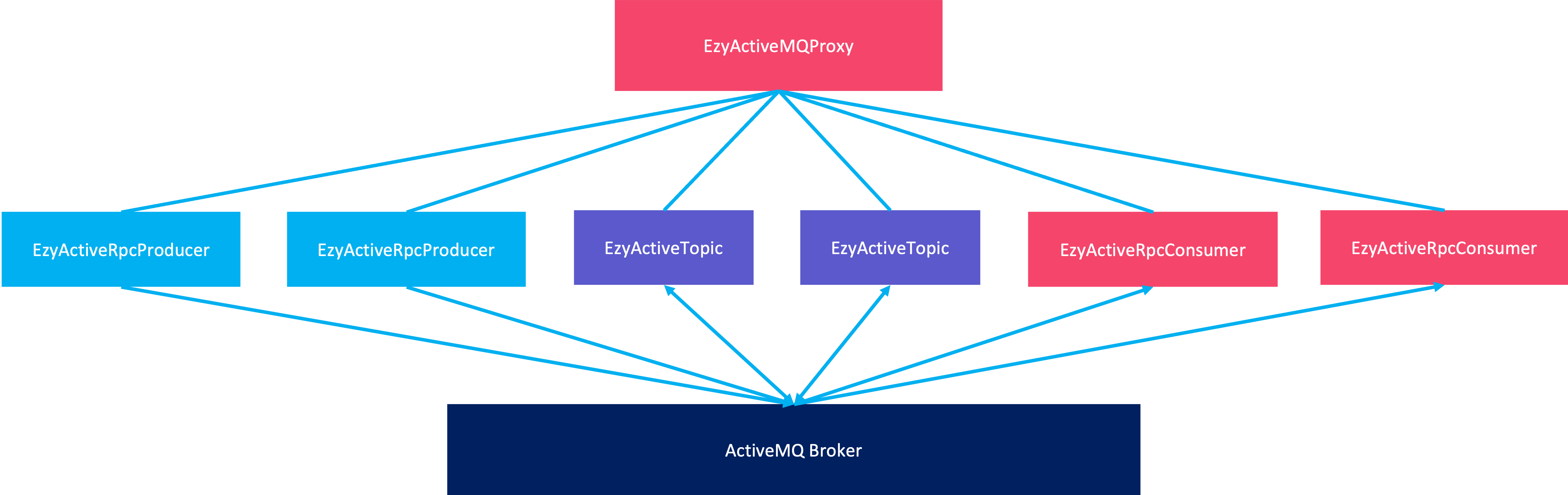
-
EzyActiveMQProxy: Manages producers, consumers, topics and data serializers. -
EzyActiveProducer: Supports to send messages and RPC. -
EzyActiveProducer: Supports to receive, consume the messages and response the RPC result -
EzyActiveTopic: Supports to send and consume messages via topic
3. Install EzyActiveMQ
1. To create EzyActiveMQ we need add dependency
<dependency>
    <groupId>com.tvd12</groupId>
    <artifactId>ezymq-activemq</artifactId>
    <version>1.2.8</version>
</dependency>
The latest version can be found in the Maven Central repository. You can configure EzyActiveMQ like this:
EzyActiveMQProxy proxy = EzyActiveMQProxy.builder()
        .scan("com.tvd12.ezymq.activemq.test")
        .build();
2. You can add to your configuration file like this:
# for application.yaml
    activemq:
      producers:
        test: default
      consumers:
        test: default
      topics:
        hello:
          producer: default
          consumer: default
# for application.properties
    activemq.producers.test=default
    activemq.consumers.test=default
    activemq.topics.hello.producer=default
    activemq.topics.hello.consumer=default
# 4. Example

Let’s say we need consume a message to sum 2 integer numbers and get the result, we can do it with EzyActiveMQ follow by bellow steps.

## 4.1 Create request/response classes

We need create a request class has 2 fields:
a and b:
package com.tvd12.ezymq.activemq.test.request;
import com.tvd12.ezyfox.message.annotation.EzyMessage;
import lombok.AllArgsConstructor;
import lombok.Data;
import lombok.NoArgsConstructor;
@Data
@EzyMessage
@AllArgsConstructor
@NoArgsConstructor
public class SumRequest {
private int a;
private int b;
}
And a response class has 1 field `sum`:
java
package com.tvd12.ezymq.activemq.test.response;
import com.tvd12.ezyfox.message.annotation.EzyMessage;
import lombok.AllArgsConstructor;
import lombok.Getter;
import lombok.ToString;
@Getter
@EzyMessage
@ToString
@AllArgsConstructor
public class SumResponse {
private int sum;
}
## 4.2 Create message handler class

Now we need create a handler class to handle the message:
java
package com.tvd12.ezymq.activemq.test.handler;
import com.tvd12.ezymq.activemq.annotation.EzyActiveHandler;
import com.tvd12.ezymq.activemq.handler.EzyActiveRequestHandler;
import com.tvd12.ezymq.activemq.test.request.SumRequest;
import com.tvd12.ezymq.activemq.test.response.SumResponse;
@EzyActiveHandler("sum")
public class SumRequestHandler implements EzyActiveRequestHandler {
@Override
public Object handle(SumRequest request) {
return new SumResponse(
request.getA() + request.getB()
);
}
}
## 4.3 Create a program for rpc client

We need create a class has `main` method to start a rpc client:
java
package com.tvd12.ezymq.activemq.test;
import com.tvd12.ezymq.activemq.EzyActiveMQProxy;
import com.tvd12.ezymq.activemq.EzyActiveRpcProducer;
import com.tvd12.ezymq.activemq.test.request.SumRequest;
import com.tvd12.ezymq.activemq.test.response.SumResponse;
public final class SumRpcClientProgram {
public static void main(String[] args) {
final EzyActiveMQProxy proxy = EzyActiveMQProxy
.builder()
.scan("com.tvd12.ezymq.activemq.test")
.build();
final EzyActiveRpcProducer producer = proxy.getRpcProducer("test");
SumResponse sumResponse = producer.call(
"sum",
new SumRequest(1, 2),
SumResponse.class
);
System.out.println("sum result: " + sumResponse);
}
}
With configration like this:
yml
for application.yaml
activemq:
producers:
test: default
## 4.4 Create a program for rpc server

We need create a class has `main` method to start consumers:
java
package com.tvd12.ezymq.activemq.test;
import com.tvd12.ezymq.activemq.EzyActiveMQProxy;
public final class SumRpcServerProgram {
public static void main(String[] args) {
EzyActiveMQProxy
.builder()
.scan("com.tvd12.ezymq.activemq.test")
.build();
}
}
With configration like this:
yml
for application.yaml
activemq:
consumers:
test: default
## 4.5 Run the program

Please make sure you have [downloaded, installed, and started the ActiveMQ](https://activemq.apache.org/getting-started) broker.

Now run the both `SumRpcServerProgram` and `SumRpcClientProgram` programs separately, we will see the log in the `SumRpcClientProgram`:
java
sum result: SumResponse(sum=3)