


EzyHTTP Request Interceptor
Updated at 1783089597000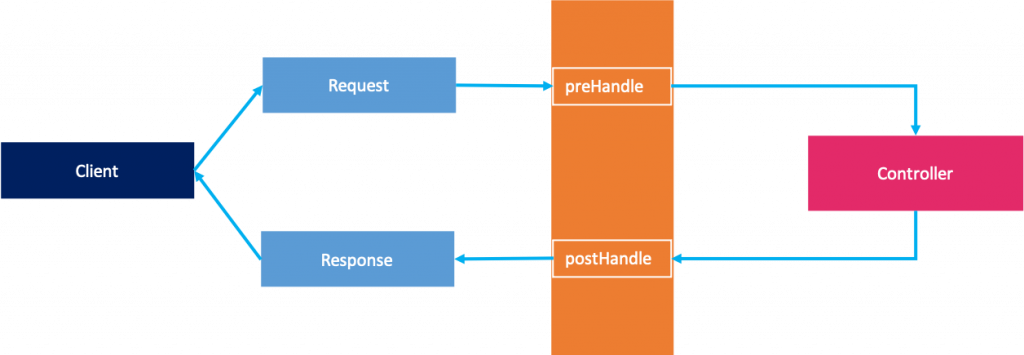
EzyHTTP Request Interceptor
Every request to EzyHTTP passes through request interceptors before it reaches the mapped controller method. You can define one or many interceptors for logging, authentication, authorization, metrics, request tracing, rate limiting, or any other cross-cutting behavior.
An interceptor is a singleton component annotated with
@Interceptor and implementing RequestInterceptor.@Interceptor public class MyRequestInterceptor implements RequestInterceptor {}
RequestInterceptor has two methods:boolean preHandle(RequestArguments arguments, Method handler) throws Exception; void postHandle(RequestArguments arguments, Method handler);
Both methods are optional because EzyHTTP provides default implementations:
-
preHandlereturnstrueby default. -
postHandledoes nothing by default.
Request lifecycle
The simplified request lifecycle looks like this:
flowchart TD
    A[Client request] --> B[Find matched URI and handler]
    B --> C[Create RequestArguments]
    C --> D[Run preHandle of interceptors]
    D --> E{All preHandle return true?}
    E -- No --> F[Return 406 Not Acceptable]
    E -- Yes --> G[Invoke controller handler]
    G --> H[Write response]
    H --> I[Run postHandle of interceptors]
    I --> J[Release RequestArguments]
For synchronous handlers,
postHandle is called after the handler finishes and the response is processed.For asynchronous handlers,
postHandle is called when the async request completes. This means an interceptor can still be used for logging, metrics, or cleanup around async APIs, but you should not assume postHandle runs immediately after preHandle.If any interceptor returns
false from preHandle, the request is rejected and the handler method will not be called. In this case, EzyHTTP responds with 406 Not Acceptable, and postHandle is not called for that request.Interceptor order
If you define multiple interceptors, EzyHTTP sorts them by
@Interceptor(priority) in ascending order. The default priority is 0.@Interceptor(priority = -100) public class TraceInterceptor implements RequestInterceptor {} @Interceptor(priority = 0) public class AuthenticationInterceptor implements RequestInterceptor {} @Interceptor(priority = 100) public class AccessLogInterceptor implements RequestInterceptor {}
With the example above, the order is:
TraceInterceptor -> AuthenticationInterceptor -> AccessLogInterceptor
Use a lower priority for interceptors that must run earlier, such as tracing or authentication. Use a higher priority for interceptors that can run later, such as access logging.
Interceptor for logging
A common use case is logging the request URI and final response status.
@Interceptor
public class LogRequestInterceptor
    extends EzyLoggable
    implements RequestInterceptor {

    @Override
    public void postHandle(RequestArguments arguments, Method handler) {
        logger.info(
            "request: {}, response: {}",
            arguments.getRequest().getRequestURI(),
            arguments.getResponse().getStatus()
        );
    }
}
In this example,
preHandle is not required because the default implementation already returns true.You can also measure request duration by storing a value in
RequestArguments during preHandle, then reading it in postHandle.@Interceptor public class RequestTimeInterceptor extends EzyLoggable implements RequestInterceptor { @Override public boolean preHandle(RequestArguments arguments, Method handler) { arguments.setArgument("startTime", System.currentTimeMillis()); return true; } @Override public void postHandle(RequestArguments arguments, Method handler) { Long startTime = arguments.getArgument("startTime"); if (startTime != null) { logger.info( "request: {}, elapsed: {} ms", arguments.getRequest().getRequestURI(), System.currentTimeMillis() - startTime ); } } }
Interceptor for authentication
EzyHTTP provides the
@Authenticated annotation. You can add it to a controller class or to a controller method.@Authenticated @Controller public class UserController { @DoGet("/me") public UserProfile getProfile(@RequestArgument UserId userId) { return userService.getProfile(userId); } }
You can also annotate only one method:
@Controller
public class ArticleController {

    @Authenticated
    @DoPost("/articles")
    public Article createArticle(
        @RequestArgument UserId userId,
        @RequestBody CreateArticleRequest request
    ) {
        return articleService.createArticle(userId, request);
    }
}
When EzyHTTP registers controller mappings, it records which URI templates require authentication. Your interceptor can then use
RequestURIManager.isAuthenticatedURI to check whether the current matched route is protected.@Interceptor @AllArgsConstructor public class AuthenticationInterceptor extends EzyLoggable implements RequestInterceptor { private final RequestURIManager requestUriManager; private final IAuthenticationService authenticationService; @Override public boolean preHandle( RequestArguments arguments, Method handler ) throws Exception { final HttpMethod method = arguments.getMethod(); final String uri = arguments.getUriTemplate(); if (!requestUriManager.isAuthenticatedURI(method, uri)) { return true; } String accessToken = arguments.getParameter("accessToken"); if (accessToken == null) { accessToken = arguments.getHeader("accessToken"); } if (accessToken == null) { accessToken = arguments.getCookieValue("accessToken"); } if (accessToken == null) { throw new TokenNotFoundException("Can not get accessToken"); } final long userId = authenticationService.verifyAccessToken(accessToken); arguments.setArgument(UserId.class, userId); return true; } }
After the interceptor stores
UserId in RequestArguments, controller methods can receive it with @RequestArgument.@Authenticated @DoGet("/users/me") public UserProfile getMe(@RequestArgument UserId userId) { return userService.getProfile(userId); }
Getting request data inside an interceptor
RequestArguments gives the interceptor access to common request data, including:arguments.getMethod(); arguments.getUriTemplate(); arguments.getRequest(); arguments.getResponse(); arguments.getParameter("name"); arguments.getHeader("Authorization"); arguments.getCookieValue("accessToken"); arguments.setArgument(UserId.class, userId); arguments.getArgument(UserId.class);
Prefer
arguments.getUriTemplate() when checking route metadata through RequestURIManager. The URI template is the route registered by EzyHTTP, while arguments.getRequest().getRequestURI() is the raw URI sent by the client.For example, a request to:
GET /users/123
may match a route template like:
/users/{id}
Authentication checks should use the matched template.
Rejecting a request
To stop a request before it reaches the controller, return
false from preHandle.@Interceptor public class MaintenanceInterceptor implements RequestInterceptor { @Override public boolean preHandle(RequestArguments arguments, Method handler) { return !maintenanceService.isMaintenanceMode(); } }
When
preHandle returns false, EzyHTTP stops the chain and returns 406 Not Acceptable.If you need a specific error response, status code, or response body, prefer throwing an application exception and handling it with an exception handler.
Best practices
Keep interceptors focused on cross-cutting concerns. Good examples are authentication, logging, tracing, rate limiting, metrics, request validation, and adding request-scoped arguments.
Avoid placing business logic in interceptors. Business rules usually belong in services or controller handlers.
Keep
preHandle fast. It runs before every matched request, so expensive database calls or remote calls should be used carefully.Use
@Interceptor(priority) when order matters. For example, tracing may need to run before authentication, and access logging may need to run after authentication has added user information.Use
postHandle for logging and cleanup. Do not rely on it to change the main response body after the handler has already produced a response.Next
You can take a look at Request Arguments to learn how to read request data and pass custom values from interceptors to controller methods.