


Introduce EzyFox Bean
Updated at 1699803762000EzyFox Bean Introduction
EzyFox Bean is a library for bean managment and dependency injection. It can manage the both singleton objects and prototype objects.
1. Structure of EzyFox Bean
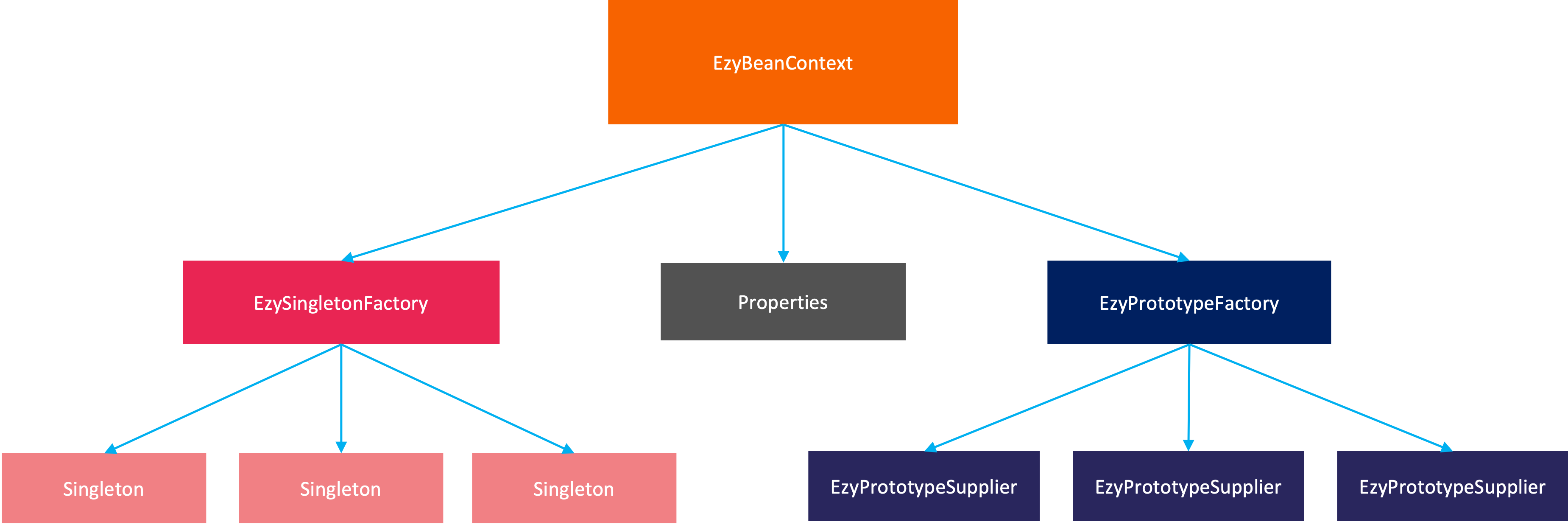
- EzyBeanContext: a composite object, manage all properties, singletons and prototypes
- Properties: EzyBeanContext will keep all properties and inject to singletons and prototypes
- EzySingletonFactory: manage all singletons
- EzyPrototypeFactory: manage all prototypes
EzyFox Bean also has many annotations and you can find out theme here.
2. Install EzyFox Bean
You can add to your dependency like this:
<dependency>
    <groupId>com.tvd12</groupId>
    <artifactId>ezyfox-bean</artifactId>
    <version>1.3.2</version>
</dependency>
The latest version can be found in the Maven Central repository.
3. Properties
Currently, EzyFox Bean support
.properties and yaml file. By default, it will read files in your classpath:- application.properties
- application.yaml
- application.yml
Let's say you have a `application.properties` like this:
book.name_pattern=[a-zA-Zs]+
book.min_price=1000
You can create a data class and EzyFox Bean will bind the properties to it automatically. Example:
@EzyPropertiesBean(prefix = "book")
    public class BookSetting {
        @Property("name_pattern")
        private String namePattern;
        @Property("min_price")
        private long minPrice;
    }
4. Singleton management
Bean initialization
EzyFox Bean will scan which packages that you provide and by default it will scan
com.tvd12.ezyfox.boot package. It find which classes are annotated with @EzySingleton, @EzyConfigurationBefore, @EzyConfiguration, @EzyConfigurationAfter to create singleton objects. Example, you have BookRepository class like bellow, EzyFox Bean will scan and create singleton for it.@EzySingleton public class BookRepository { public void save(Book book) { System.out.println("saved book: " + book); } }
Bean binding
EzyFox Bean support binding vi constructor and
@EzyAutoBind annotation, but we recommend you use constructor binding because you will don't need use setter method and make your class is immutable. Example:@EzySingleton @AllArgsConstructor public class BookService { private final BookSetting bookSetting; private final BookRepository bookRepository; public void saveBook(Book book) { if (!book.getName().matches(bookSetting.getNamePattern())) { throw new IllegalArgumentException("invalid book name"); } bookRepository.save(book); } }
5. Prototype management
EzyFox Bean will create a prototype supplier for a class that's annotated by `@EzyPrototype` annotation, example:
@Setter
    @EzyPrototype
    public class BookPriceCalculator {
        private Book book;
        @EzyProperty("book.discount")
        private int discount;
        public long calculate() {
            return book.getPrice() - discount;
        }
    }
4. Example
Now combine properties, singletons and prototypes we can create a
EzyBeanContext and get bean (singleton and prototype) to use:public final class EzyFoxBeanExample { public static void main(String[] args) { final EzyBeanContext beanContext = EzyBeanContext.builder() .scan("com.tvd12.ezyfox.example.bean") .build(); final BookController bookController = beanContext.getBeanCast(BookController.class); final Book book = new Book(1L, "EzyFox in action", 2000); bookController.saveBook(book); final BookPriceCalculator bookPriceCalculator = beanContext.getBeanCast(BookPriceCalculator.class); bookPriceCalculator.setBook(book); final long bookPrice = bookPriceCalculator.calculate(); System.out.println("book price: " + bookPrice); } }