


Guide to Implementing Batch Jobs with AdminDataAppender
Updated at 1773150609000In many admin systems, background batch tasks are required to process data such as:
- generating search indexes
- synchronizing data
- creating search keywords
- processing logs or analytics
In EzyPlatform, these tasks are handled through the AdminDataAppender mechanism.
It is a lightweight framework that allows you to build simple, safe, and extensible batch jobs.
Overview of How AdminDataAppender Works
AdminDataAppender follows a pull + pagination + checkpoint model.
Basic workflow:
- The scheduler runs a background loop
- Each
AdminDataAppenderis executed - The appender reads data using a
pageToken - Data is transformed into
dataRecord - Records are written to the target system
- A new
pageTokenis generated - The checkpoint is stored in the database
Mermaid illustration:
flowchart TD

Scheduler[AdminDataOperationScheduler]
Appender[AdminDataAppender]

Scheduler -->|loop| Appender

Appender --> LoadToken[Load lastPageToken]
LoadToken --> QueryData[getValueList]

QueryData --> Filter[filterValueList]
Filter --> Transform[toDataRecords]

Transform --> Store[addDataRecords]

Store --> ExtractToken[extractNewLastPageToken]
ExtractToken --> SaveToken[save token to settings]

SaveToken --> NextLoop[next append cycle]
Key characteristics of this design:
- incremental processing
- avoids loading the entire dataset
- includes checkpoint recovery
- runs continuously in the background
Scheduler Running the Appenders
All batch operations run in a single background thread created by:
AdminDataOperationScheduler
The scheduler:
- retrieves all
AdminDataAppenderinstances - sorts them by
priority - executes them in a loop
Pseudo flow:
while(true)
   sleep(1500ms)

   run all removers

   run all appenders
This ensures:
- no concurrent batch conflicts
- simpler and more predictable execution
Design Patterns Used
Template Method Pattern
AdminDataAppender defines the main processing pipeline:
append()
   -> doAppend()
       -> getValueList()
       -> filterValueList()
       -> toDataRecords()
       -> addDataRecords()
       -> extractNewLastPageToken()
Subclasses only need to override specific steps.
Example:
protected abstract List<V> getValueList(P pageToken);
Benefits:
- standardized pipeline
- reduced duplicate code
- consistent behavior
Strategy Pattern
Different processing behaviors are implemented by overriding methods such as:
-
filterValueList -
toDataRecords -
addDataRecords
Each appender acts as a strategy for handling a specific data pipeline.
Checkpoint Pattern
Batch state is stored using:
pageToken
The token is persisted via:
AdminSettingService
This allows the batch job to:
- resume after server restarts
- avoid reprocessing old data
Singleton Pattern
All appenders are managed through:
EzySingletonFactory
Using the annotation:
@EzySingleton
The scheduler automatically discovers and runs these appenders.
Implementing an AdminDataAppender
Example: creating a batch job to index user keywords.
First, create a class extending
AdminDataAppender.@EzySingleton public class AdminUserIndexAppender extends AdminDataAppender<User, AddUserKeywordModel, LastUpdatedAtPageToken> {
Generic parameters:
V = source data entity
D = data record to store
P = page token type
Default Configuration
@Override
protected boolean defaultStarted() {
    return true;
}
This allows the batch job to start automatically when the server starts.
Querying Data
Override:
protected List<User> getValueList(LastUpdatedAtPageToken pageToken)
Example:
return userRepository
    .findUsersByUpdatedAtAndIdPaginationAsc(
        pageToken.getUpdatedAt(),
        pageToken.getIdNumber(),
        Next.limit(pageToken.getLimit())
    );
This ensures:
- incremental queries
- avoids full table scans
Transforming Data
Convert entities into data records:
@Override
protected Set<AddUserKeywordModel> toDataRecords(User value)
Example:
Set<String> keywords = userKeywordsExtractor.extract(value);

return keywords.stream()
    .map(keyword ->
        AddUserKeywordModel.builder()
            .userId(value.getId())
            .keyword(keyword)
            .priority(keyword.length())
            .build()
    )
    .collect(Collectors.toSet());
Storing Data
Override:
protected void addDataRecords(List<AddUserKeywordModel> dataRecords)
Example:
userKeywordService.addUserKeywords(dataRecords);
Updating the Page Token
After processing one page:
@Override
protected LastUpdatedAtPageToken extractNewLastPageToken(
    List<User> valueList,
    LastUpdatedAtPageToken currentLastPageToken
)
Example:
return currentLastPageToken.newLastPageToken(
    valueList.size(),
    () -> extractLastUpdatedAt(last(valueList)),
    () -> extractLastId(last(valueList))
);
Default Page Token
When the batch runs for the first time:
@Override
protected LastUpdatedAtPageToken defaultPageToken() {
    return LastUpdatedAtPageToken.defaultPageToken(
        MIN_SQL_DATETIME
    );
}
Defining Token Type
@Override
protected Class<LastUpdatedAtPageToken> pageTokenType() {
    return LastUpdatedAtPageToken.class;
}
Naming the Appender
This name is used to store checkpoint settings.
@Override
protected String getAppenderNamePrefix() {
    return "ezyplatform_users_keywords";
}
Settings will be stored as:
ezyplatform_users_keywords_appender_page_token
ezyplatform_users_keywords_appender_started
Controlling the Batch Job
Batch jobs can be controlled at runtime:
start()
stop()
reload()
Example:
appender.stop();
Or reset the checkpoint:
appender.reload();
Enable, Disable, and Reload Appenders
You can access the path
your_admin_url/settings/regular, then scroll to the bottom where you will find the Data Appenders section. Click the Show button, and the list of data appenders will appear. From there, you can operate the appender you want.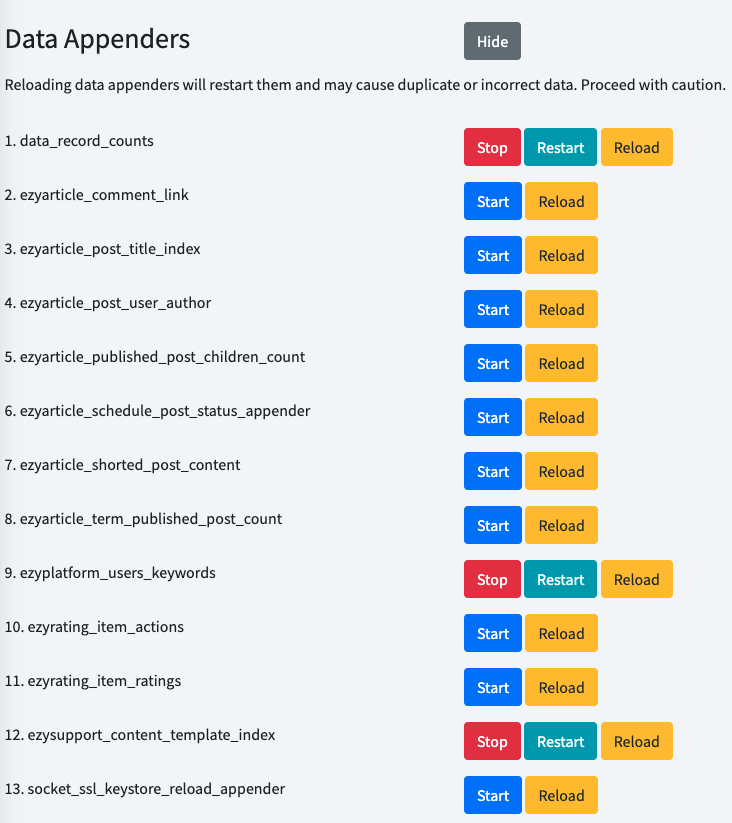
Conclusion
AdminDataAppender provides a lightweight mechanism in EzyPlatform for:- background data processing
- incremental batch jobs
- safe checkpoint recovery
- easy extensibility
The design combines several well-known patterns:
- Template Method
- Strategy
- Singleton
- Checkpoint
As a result, implementing a new batch job usually requires only three steps:
- Query the data
- Transform the data
- Store the results
The rest of the processing pipeline is handled by the framework.